

Frequently Asked Questions
On this page you will find all the information to make your use of the netfest platform easier and simpler. If your question is not present among those listed below, you can write us an e-mail at the address available at the bottom of this page, and we will reply as soon as possible.
What is streaming?
In this case, streaming simply means watching a video over your internet connection (instead of downloading a file to your computer). It’s immediate and available on demand with any device that’s connected to the internet. Anytime you watch a film on Amazon Prime, or a video on YouTube, you’re streaming!
What should I do to watch a movie?
First you need to register or to login in, then from the single film page click on the player icon  button. As the film screening has limited seats, it is necessary to reserve seats before the start of each screening. After reserving your seat, click on the play icon again and you can start watching the film.
To watch a movie do I need to register?
Yes, you must register through the registration form.
What should I do to register?
Click on the sign up button and you will redirect to registration page. Once there just follow the instruction. After you insert your email you will receive on your email account a confirmation code (temporary password), please past this code in the page. If you will not receive the confirmation email, please check into your spam folder.
Login with a password or with an OTP (One Time Password)
To access the site you can set a password that you can use every time you connect. Alternatively, you can decide to receive a temporary password (OTP) on your email that you will need to enter in the appropriate form. If you enter your phone number, this temporary password (OTP) will be sent to you not only on the email but also on the phone.
I am able to watch a movie with my internet connection even if it's very slow?
Yes, we recognize your connection speed, and automatically we show you the best quality that allows your connection fluidity.
When can I watch a movie?
Please read carefully the information on every film box, where you can find the date and the time of the screening.
I.e. if in a film box you see Jun 27 | 1:00 AM → Jul 1 | 11:00 PM | 39′, this means that you can watch a film from June 27 (from 1:00 am) to July 1st (till 11:30 pm), at any time and as often as you like! The number 39′ is the film running time.
If you read this on a film box: The film can only be viewed in person at the festival venues, this means that the film it’s not available to watch on netfest, but just in person at the Festival venues.
– Limited seats, so please reserve your seats before the start of the screening.
– Available in Italy
– Free
How do I book a seats for a film?
To book go to the movie page click on the watch movie button and you will be automatically booked. As the viewing of the films is limited, we invite you not to book a film if you are not sure you can see it, as in this way you could deny this possibility to someone else.
Can I restart watching a movie if I lose my internet connection?
Yes. Our system can understand if you screen the entire film or not.
so in this case you can restart watching the movie.
How to activate subtitles and audio on your player
To activate subtitles click on the CC button in the lower right side of the player
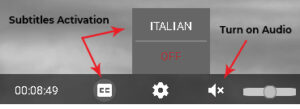
Every time you watch a movie you must turn audio on, to do this click on the audio icon on the left lower side of the player.
Can I stream films to my TV?
Yes, you can directly stream from devices such as Smart TVs or media players, or mirroring your device.
Watch on your computer, mobile phone or tablet:
Currently you can stream through the following web browsers: Google Chrome, Firefox, Safari, Microsoft Edge, and Opera. For both PC and Apple computers, we recommend that you use the latest version of your browser.
Screen Sharing (Chromecast & Apple TV)
You can stream films on Chromecast or Apple TV (all generations) by screen sharing your smartphone, tablet, or computer on the same Wi-Fi network. Instructions for screen sharing using your Apple TV using AirPlay can be found here. For information on screen sharing using your Chromecast, click here.
HDMI
If you have a laptop or nearby computer with an HDMI port, you can connect it directly to your television, using it as a second monitor. That said, connection details will depend on your setup. We recommend referencing your television’s manual for more information.
How much it cost a film ticket?
Asincronie Festival is free.
VERY IMPORTANT
If you’re not sure you want to watch a film, don’t reserve your spot, or you might prevent someone else from having the chance. Even though each film has limited seats, there are enough for everyone to watch!
If You Have Any Questions or Concerns, Please Contact Us.
You can contact us at [email protected]